Posts

Microsoft OneNote

Microsoft OneNote is a computer program for multi-user collaboration and free form information gathering. It gathers users notes, drawings, screen clippings and audio commentaries. Notes can be shared with other OneNote users over the Internet or a network. OneNote is available as a part of Microsoft Office and Windows 10. It is also available as a free standalone application for Windows, mac OS, Windows RT, Windows Phone, iOS and Android. A web-based version of OneNote is provided as part of OneDrive or Office Online and enables users to edit notes via a web browser. OneNote for the students to organize your lesson plans, course contents and make important notes in your own digital notebook. Keep everything in a OneNote Class Notebook, and use its powerful search tool to find what you're looking for, even text in pictures or handwriting. School work includes a lot of information, and OneNote helps you, students capture it all, on all devices. With it, everyone can stay or...


Office 365

Office 365 . "Office 365" refers to subscription plans that include access to Office applications plus other productivity services that are enabled over the Internet (cloud services). Office 365 includes plans for use at home and for business. Learn about Office 365 for use at home . Office 365 plans for business include services such as Skype fo...

Microsoft Office 365 and Azure for Education training to school principal/decision makers at Microsoft Innovation center lahore

Image

Microsoft Office 365 and Azure for Education training to school principal/decision makers at Microsoft office Islamabad

Image

Azure

Image
Azure is available in 140 countries, including China, and supports 17 languages and 24 currencies, 38 Azure regions, more than any cloud provider The Azure Platform is supported by a growing network of Microsoft-managed datacenters. Microsoft has decades of experience running services such as Bing, Office 365, and outlook.com. Azure is available in 140 countries, including China, and has invested in offerings specifically for US Government and Germany. Azure supports 17 languages and 24 currencies, all backed by Microsoft's $15 billion (USD) investment in global datacenter infrastructure. Azure is continuously investing in the latest infrastructure technologies, with a focus on high reliability, operational excellence, cost-effectiveness, environmental sustainability, and a trustworthy online experience for customers and partners worldwide.

Microsoft Teams rolls out to Office 365

Image
Microsoft Teams rolls out to Office 365 customers worldwide   a

office 365 Migration Tools

Image
MigrationWiz is a cloud-based email and data migration solution that allows you to migrate from any source to any destination. All migrations are performed directly from your web browser through a single common user interface.  https://www.bittitan.com/get-started/office-365/

Set up connectors of office 365 with your own email servers

Image
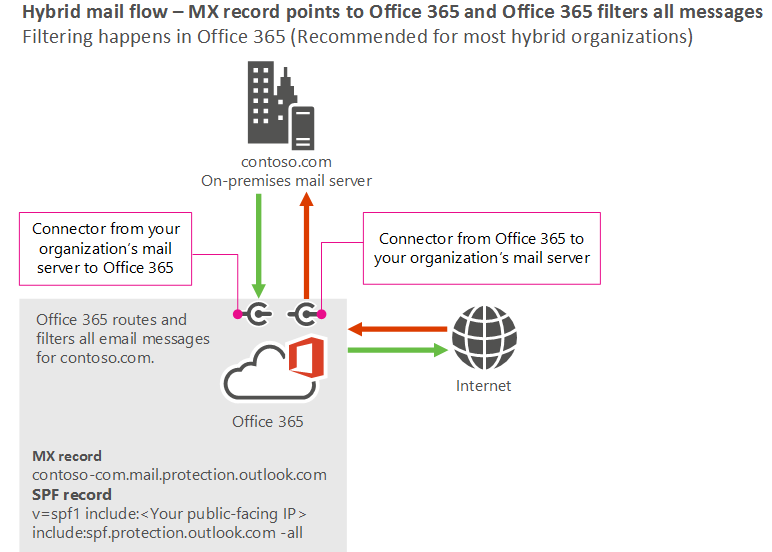
The diagram below shows how connectors in Office 365 (including Exchange Online or EOP) work with your own email servers.

Site Recovery Manager VS Backup

The difference between Azure back up and Site recovery is as below Site Recovery manager  : The feature addition allows companies to protect its on-premises, heterogeneous systems. Built on the technology obtained as part of the In Mage Systems acquisition, advantages include: Protection of physical Windows or Linux servers. Simple replication, failover, and recovery using the Azure Site Recovery portal. Data replication over the Internet, a site-to-site VPN connection, or over Azure ExpressRoute. Failback (restore) from Azure to an on-premises VMWare infrastructure.

Azure Resource Manager vs classic deployment

When deciding which deployment model to use for your resources, there are three scenarios to be aware of: The service supports Resource Manager and provides only a single type. The service supports Resource Manager but provides two types - one for Resource Manager and one for classic. This scenario applies only to virtual machines, storage accounts, and virtual networks.

Migrate PST files to Exchange and Office 365

Image
Steps: Give import/export privilege to the user (Exchange > compliance > import/export) Office 365> import>   upload file over the internet > Download Azure AzCopy tool for Azure uploading ( Microsoft Azure AZCopy Tool ) Copy the secure storage account key Use Microsoft Azure AZCopy tool to upload your data create CSV file uploading files access to the mapping file Reference : https://support.office.com/en-us/article/Overview-of-importing-PST-files-and-SharePoint-data-to-Office-365-ba688e0a-0fcb-4bd7-8e57-2b669564ea84?ui=en-US&rs=en-US&ad=US&fromAR=1

office 365 Mail flow in Hybrid Deployment

Image
Scenario 1 – MX record points to Office 365, and Office 365 filters all messages Scenario 2 - MX record points to Office 365, and mail is filtered on-premises Scenario 3 – MX record points to your on-premises servers  Scenario 4 – MX record points to your on-premises server, Your on-premises server relay messages to the internet through Office 365.

Office 365 Overview

Office 365 is Microsoft Cloud Base SAS (Software As a Service) model. Office 365 . "Office 365" refers to subscription plans that include access to Office applications plus other productivity services that are enabled over the Internet (cloud services). Office 365 includes plans for use at home and for business. Learn about Office 365 for use at home . Office 365 plans for business include services such as ...

Office 365 Roles

Depending on the size of your organization, you may want to designate several admins who serve different functions. The following admin roles are available: Global admin: Has access to all administrative features. Global admins are the only admins who can assign other admin roles. You can have more than one global admin in your organization. The person who signs up to purchase Office 365 becomes a global admin.

Office 365 Exchagne Hybrid deployment

Image
Hybrid deployments can be configured for on-premises Exchange 2007-based organizations or later but you have to install at least one hybrid server in your existing Microsoft Exchange organization e.g. Exchanger server 2010/13. Hybrid deployment prerequisites Office 365 Tenant (you can also deploy it on trial) On-premises environment Exchange 2010 minimum Active and Valid Public SSL certificate e.g. DigiCert https://www.digicert.com/exchange-ssl-certificate.htm Auto Discover enable  video with complete steps  

Add DPOR (Digital Partner of Record)

Digital Partner of Record and Partner Association Now, multiple partners can get credit for driving customer cloud consumption. We’ve made program enhancements to benefit all partners involved in a cloud subscription. With DPOR and new Partner Association methods, multiple partners can be recognized for the value they add to customers’ cloud subscriptions, and everyone benefits.
Image
Choose Go to setup /Domain   on the Office 365 Admin center to start the wizard. (Be sure to sign in to Office 365 first.) Add the domain you want to use. Follow the steps in the wizard to enter your custom domain name, and then add the record that verifies to Office 365 that you own the domain. Verify on click

Existing Office 365 SMB Customers Can Change to the New Plans

Image
Over a year ago, Microsoft made major changes to its Office 365 plans for small- and medium-sized businesses (SMBs). But now, 15 months later, existing Office 365 SMB customers can finally switch their old plans to one of the new plans. If you’re a long time Office 365 SMB customer, as I am, this change can be confusing. When Microsoft first introduced its Office 365 SMB offerings, there were three plans: Office 365 Small Business. At a cost of $5 per user per month ($60/year), this offering provided the core Office 365 cloud services—Exchange Online-based email and calendaring with 50 GB of storage, SharePoint Online-based cloud storage and file sharing, Lync Online- (later Skype for Business-) based online meetings, IM, and video conferencing, Office Online, and more. It was originally capped at 25 users.